10.4. Socket - UDP
10.4.1. Introduction to UDP protocol
UDP (User Datagram Protocol) is a connectionless, unreliable, transport protocol communication protocol based on datagram.
The communication process of UDP is more simple than that of TCP. The three-way handshake and four-way handshake that do not need to be copied reflect the connectionless. Therefore, UDP transmission speed is faster than TCP, but it is easy to lose packets, the data arrival order is not guaranteed, the lack of congestion control, adhering to the principle of best effort delivery, reflects the unreliability.
The following figure explains the interactive process of the UDP communication connection between the server and the client:

Socket UDP communication process
10.4.2. UDP Programming
Usually when we talk about network programming, it refers to TCP programming by default, which is the TCP method we talked about in the previous chapter. When the socket function creates a socket object, no parameters are given, and the default is SOCK_STREAM , which is socket (socket.AF_INET, socket.SOCK_STREAM), which means that a socket is created for streaming network communication.
SOCK_STREAM is connection-oriented, that is, each time you send and receive data, you must create a connection through connect , which is also bidirectional, that is, any party can send and receive data. The protocol itself provides some guarantee mechanisms to ensure that it is reliable , Ordered, that is, each packet arrives at the receiver in the order in which it was sent.
SOCK_DGRAM is the network communication of the User Datagram Protocol. It is connectionless and unreliable, because the two parties of the communication do not know whether the other party has received the data or whether it has received the data normally.
After any socket, you can use sendto to send data, and you can also use recvfrom to receive data. I don’t care if the other party exists or if data is sent. It is characterized by relatively fast communication speed. Everyone knows that TCP is going to shake hands three times, but UDP does not.
10.4.2.1. UDP Client
The usual steps of UDP programming client are:
- Create a UDP socket, use the function socket(socket.AF_INET, socket.SOCK_DGRAM)
- To set the socket attribute, use the function
setsockopt()optional - Bind the IP address, port and other information to the socket, use the function
bind()optional - Set the other party’s IP address and port attributes
- To send data, use the function
sendto() - Close network connection
Example of UDP client:
1 2 3 4 5 6 7 8 9 10 11 12 13 14 15 16 17 18 19 20 21 | from mpython import *
import socket
mywifi=wifi() # 创建wifi对象
mywifi.connectWiFi("ssid","password") # 连接网络
dst = ("192.168.0.3", 6000) # 目的ip地址和端口号
# 捕获异常,如果在"try" 代码块中意外中断,则停止关闭套接字
try:
s = socket.socket(socket.AF_INET, socket.SOCK_DGRAM) # 创建UDP的套接字
s.setsockopt(socket.SOL_SOCKET,socket.SO_REUSEADDR,1) # 设置套接字属性
while True:
s.sendto(b'hello message from mPython\r\n',dst) # 发送数据发送至目的ip
sleep(2)
# 当捕获异常,关闭套接字、网络
except:
if (s):
s.close()
mywifi.disconnectWiFi()
|
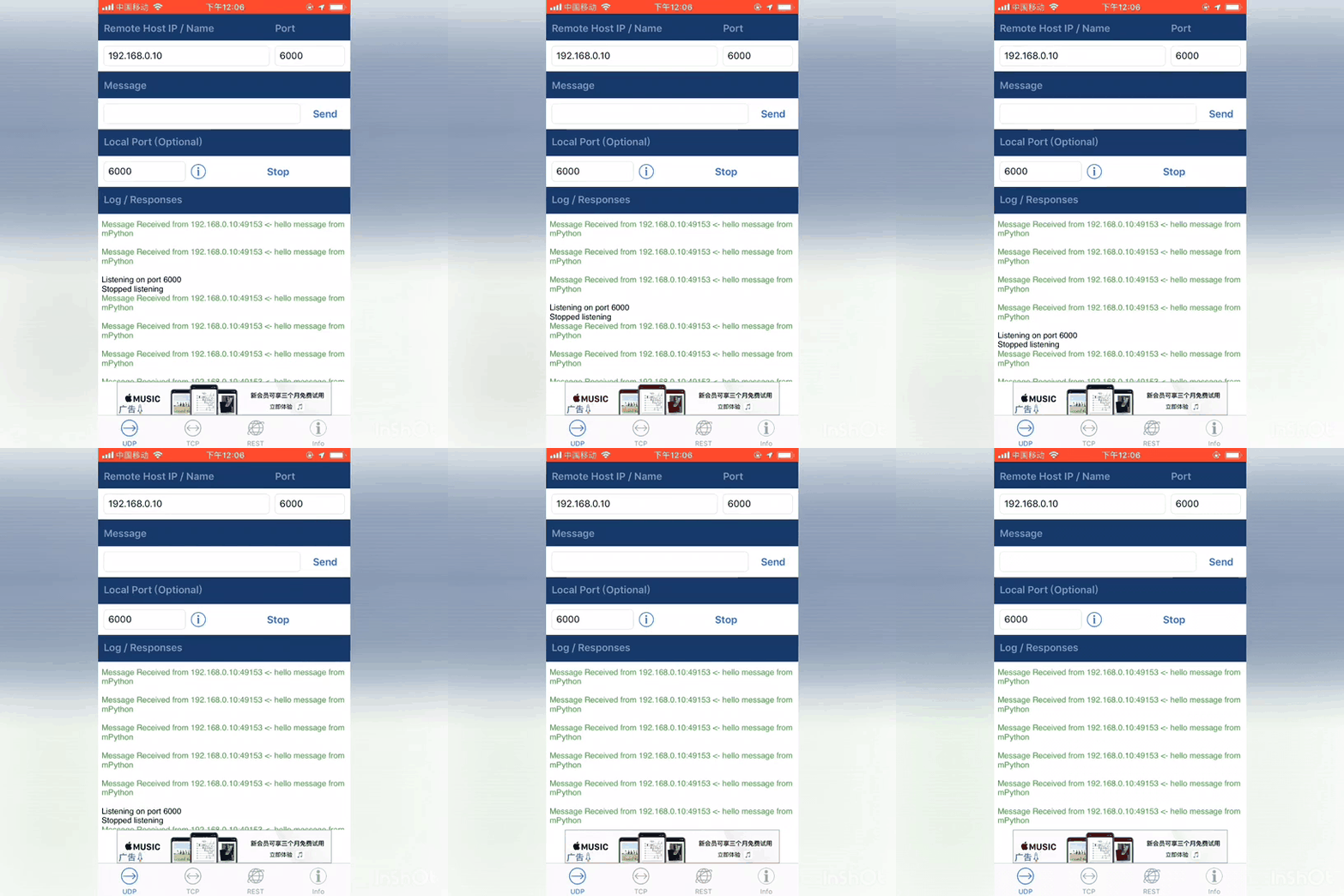
10.4.2.2. UDP Server
The usual steps of the server side of UDP programming are:
- Create a UDP socket, use the function socket(socket.AF_INET, socket.SOCK_DGRAM)
- To set the socket attribute, use the function
setsockopt()可选 - Bind the IP address, port and other information to the socket, use the function
bind() - BReceive data in a loop, using the function
recvfrom() - Close network connection
1 2 3 4 5 6 7 8 9 10 11 12 13 14 15 16 17 18 19 20 21 22 23 24 25 26 27 28 29 | from mpython import *
import socket
mywifi=wifi() # 创建wifi对象
mywifi.connectWiFi("ssid","password") # 连接网络
# 捕获异常,如果在"try" 代码块中意外中断,则停止关闭套接字
try:
s = socket.socket(socket.AF_INET, socket.SOCK_DGRAM) # 创建UDP的套接字
s.setsockopt(socket.SOL_SOCKET,socket.SO_REUSEADDR,1) # 设置套接字属性
ip=mywifi.sta.ifconfig()[0] # 获取本机ip地址
s.bind((ip,6000)) # 绑定ip和端口号
print('waiting...')
oled.DispChar("%s:6000" %ip,0,0)
oled.show()
while True:
data,addr=s.recvfrom(1024) # 接收对方发送过来的数据,读取字节设为1024字节,返回(data,addr)二元组
print('received:',data,'from',addr) # 打印接收到数据
oled.fill(0) # 清屏
oled.DispChar("%s" %data.decode(),0,15) # oled显示接收内容
oled.DispChar("from%s" %addr[0],0,31)
oled.show()
# 当捕获异常,关闭套接字、网络
except:
if (s):
s.close()
mywifi.disconnectWiFi()
|
Note
The return value of the``recvfrom()`` function is a binary (bytes, address), where bytes is the received byte data and address is the sender ’s IP address and port number,
It is represented by a two-tuple (host, port). Note that the return value of the recv() function only has bytes data. UDP, each time you send sendto() and receive dat recvfrom , you need to specify the address information. Unlike TCP programming, you do not need to cal listen() and accept() .
Attention
In the above example, use connectWiFi() to connect to the same router wifi. You can also use enable_APWiFi() to turn on the AP mode and build a wifi network for other devices to access. So you don’t need to rely on other router wifi network.