10.5. HTTP
HTTP is based on the client / server (C / S) architectural model, exchanges information through a reliable link, and is a stateless request / response protocol.
A HTTP “Client” is an application (web browser or any other client) that connects to the server to send one or more HTTP requests to the server.
10.5.1. HTTP GET request
The following example shows how to download a webpage. HTTP uses port 80, you first need to send a “GET” request to download any content. As part of the request, you need to specify the page to retrieve.
1 2 3 4 5 6 7 8 9 10 11 12 13 14 15 16 17 18 19 20 21 22 23 24 25 | import socket
# 定义http get函数
def http_get(url):
# 解析url
_, _, host, path = url.split('/', 3)
# 将网站的域名解析成IP地址
addr = socket.getaddrinfo(host, 80)[0][-1]
# 构建socket
s = socket.socket()
# 连接IP地址
s.connect(addr)
# 以http get 请求格式发送
s.send(bytes('GET /%s HTTP/1.0\r\nHost: %s\r\n\r\n' % (path, host), 'utf8'))
while True:
# socket接收
data = s.recv(100)
if data:
print(str(data, 'utf8'), end='')
else:
break
s.close()
# 访问 http://micropython.org/ks/test.html
http_get('http://micropython.org/ks/test.html')
|
Hint
When using the socket module, please connect to wifi first and make sure you can access the Internet. For details of WiFi connection, see 配置wifi 。
http_get('http://micropython.org/ks/test.html') , the mPython Board client sends a GET request of the range TEST path resource to the micropython.org server. After receiving the request, the server will return the data to the client.
10.5.1.1. urequest module
The above is to use the SOCKET to implement the HTTP GET request. Use urequests module, which encapsulates some common request methods of the HTTP protocol, is easier to use.
1 2 3 4 5 6 7 8 9 10 | import urequests
from mpython import *
my_wifi = wifi()
my_wifi.connectWiFi('ssid','psw')
# http get方法
r = urequests.get('http://micropython.org/ks/test.html')
# 响应的内容
r.content
|
More details urequests module usage, please refer to the module description.
10.5.2. HTTP Server
1 2 3 4 5 6 7 8 9 10 11 12 13 14 15 16 17 18 19 20 21 22 23 24 25 26 27 28 29 30 31 32 33 34 35 36 37 38 39 40 41 42 43 44 | import socket
import network,time
from mpython import *
# 实例化wifi类
mywifi=wifi()
# WiFi连接,设置ssid 和password
mywifi.connectWiFi("ssid","psw")
def main():
s = socket.socket()
ai = socket.getaddrinfo(mywifi.sta.ifconfig()[0], 80)
print("Bind address info:", ai)
addr = ai[0][-1]
s.setsockopt(socket.SOL_SOCKET, socket.SO_REUSEADDR, 1)
s.bind(addr)
s.listen(5)
print("Listening, connect your browser to http://%s:80/" %addr[0])
# oled显示掌控板ip地址
oled.DispChar('Connect your browser',0,0,)
oled.DispChar('http://%s' %addr[0],0,16)
oled.show()
while True:
res = s.accept()
client_s = res[0]
client_addr = res[1]
print("Client address:", client_addr)
print("Client socket:", client_s)
req = client_s.recv(4096)
print("Request:")
print(req)
# 状态行
client_s.send(b'HTTP/1.0 200 OK\r\n')
# 响应类型
client_s.send(b'Content-Type: text/html; charset=utf-8\r\n')
# CRLF 回车换行
client_s.send(b'\r\n')
# 响应内容
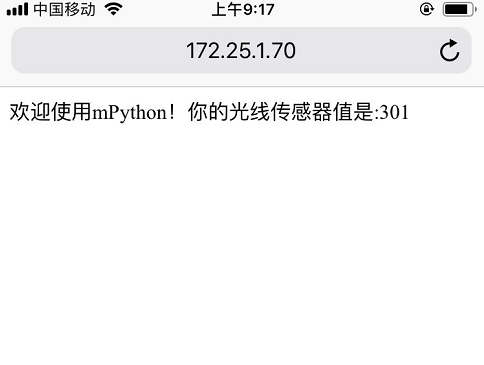
content = '欢迎使用掌控板mPython!你的光线传感器值是:%d' % light.read()
client_s.send(content)
# 关闭socket
client_s.close()
|
Run MAIN in REPL:
>>> main()
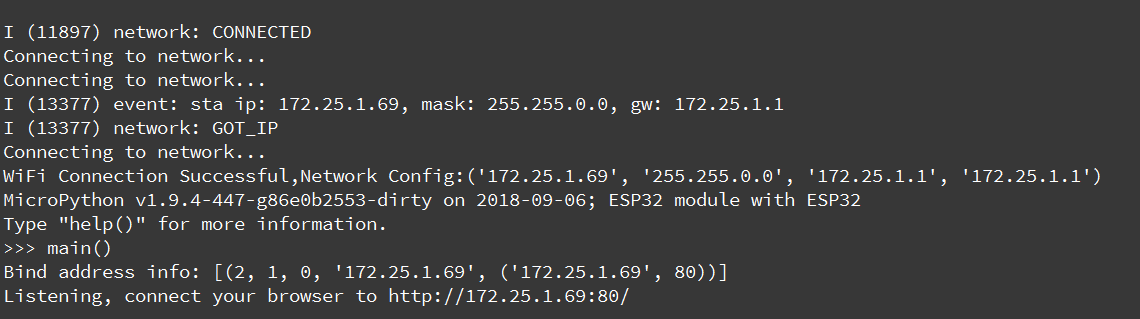
Connect the same WiFi to the mobile phone or laptop to make it in the same LAN. Press the print prompt or oled screen to display ip, use the browser to access the IP address of the control panel host.