10.3. Socket - TCP
10.3.1. What is socket?
Socket is an abstract concept of network programming. Usually we use a Socket to mean “opened a network line”, and open a Socket need to know the IP address and port number of the target computer, and then specify the protocol type.
10.3.2. Introduction to TCP protocol
TCP protocol, Transmission Control Protocol (Transmission Control Protocol, abbreviated as TCP) is a connection-oriented, reliable, byte stream-based transport layer communication protocol, defined by IETF RFC 793.
TCP communication needs to go through three steps: creating a connection, data transmission, and terminating the connection. In the TCP communication model, before communication starts, you must first create a relevant connection before sending data, similar to “calling”” in daily routine。
When the socket is working, the two sides of the connection are divided into server and client, that is, C / S mode, and the TCP communication principle is as follows:

Socket TCP communication process
10.3.3. TCP programming
This part of the tutorial will show how to use TCP sockets as a client or server. For more comprehensive use of the socket module, please refer to usocket module.
The following tutorials need to use TCP network debugging tools. The following is the Network Test Utility of IOS,You can search and install in the APP Store, please click to download the android system 。 Network Test Utility.apk
Announcement: The TCP client (tcpClient)here is your computer or mobile phone, and the TCP server (tcpServer)is the mPython Board.
10.3.3.1. TCP client
The general steps of TCP programming client are:
- Create a socket, use function socket()
- To set the socket property, use the functions setsockopt() , optional
- Bind the IP address, port and other information to the socket, use the function bind() , optional
- Set the IP address and port of the other party to be connected
- To connect to the server, use the function connect()
- To send and receive data, use the functions send() and recv(), or read() and write()
- Close network connection
1 2 3 4 5 6 7 8 9 10 11 12 13 14 15 16 17 18 19 20 21 22 23 24 25 26 27 28 29 30 31 32 33 34 35 36 37 38 | import socket
from mpython import *
host = "172.25.1.63" # TCP服务端的IP地址
port = 5001 # TCP服务端的端口
s=None
mywifi=wifi() # 创建wifi类
# 捕获异常,如果在"try" 代码块中意外中断,则停止关闭套接字
try:
mywifi.connectWiFi("ssid","password") # WiFi连接,设置ssid 和password
# mywifi.enable_APWiFi("wifi_name",13) # 还可以开启AP模式,自建wifi网络
ip=mywifi.sta.ifconfig()[0] # 获取本机IP地址
s = socket.socket(socket.AF_INET, socket.SOCK_STREAM) # 创建TCP的套接字,也可以不给定参数。默认为TCP通讯方式
s.setsockopt(socket.SOL_SOCKET, socket.SO_REUSEADDR, 1) # 设置socket属性
s.connect((host,port)) # 设置要连接的服务器端的IP和端口,并连接
s.send("hello mPython,I am TCP Client") # 向服务器端发送数据
while True:
data = s.recv(1024) # 从服务器端套接字中读取1024字节数据
if(len(data) == 0): # 如果接收数据为0字节时,关闭套接字
print("close socket")
s.close()
break
print(data)
data=data.decode('utf-8') # 以utf-8编码解码字符串
oled.fill(0) # 清屏
oled.DispChar(data,0,0) # oled显示socket接收数据
oled.show() # 显示
s.send(data) # 向服务器端发送接收到的数据
# 当捕获异常,关闭套接字、网络
except:
if (s):
s.close()
mywifi.disconnectWiFi()
|
Attention
Since they are transmitted in bytes on the network, you need to pay attention to data encoding and decoding.
Attention
In the above example, use connectWiFi() to connect to the same router wifi. You can also use enable_APWiFi() to turn on the AP mode and build a wifi network to allow other devices to access it.
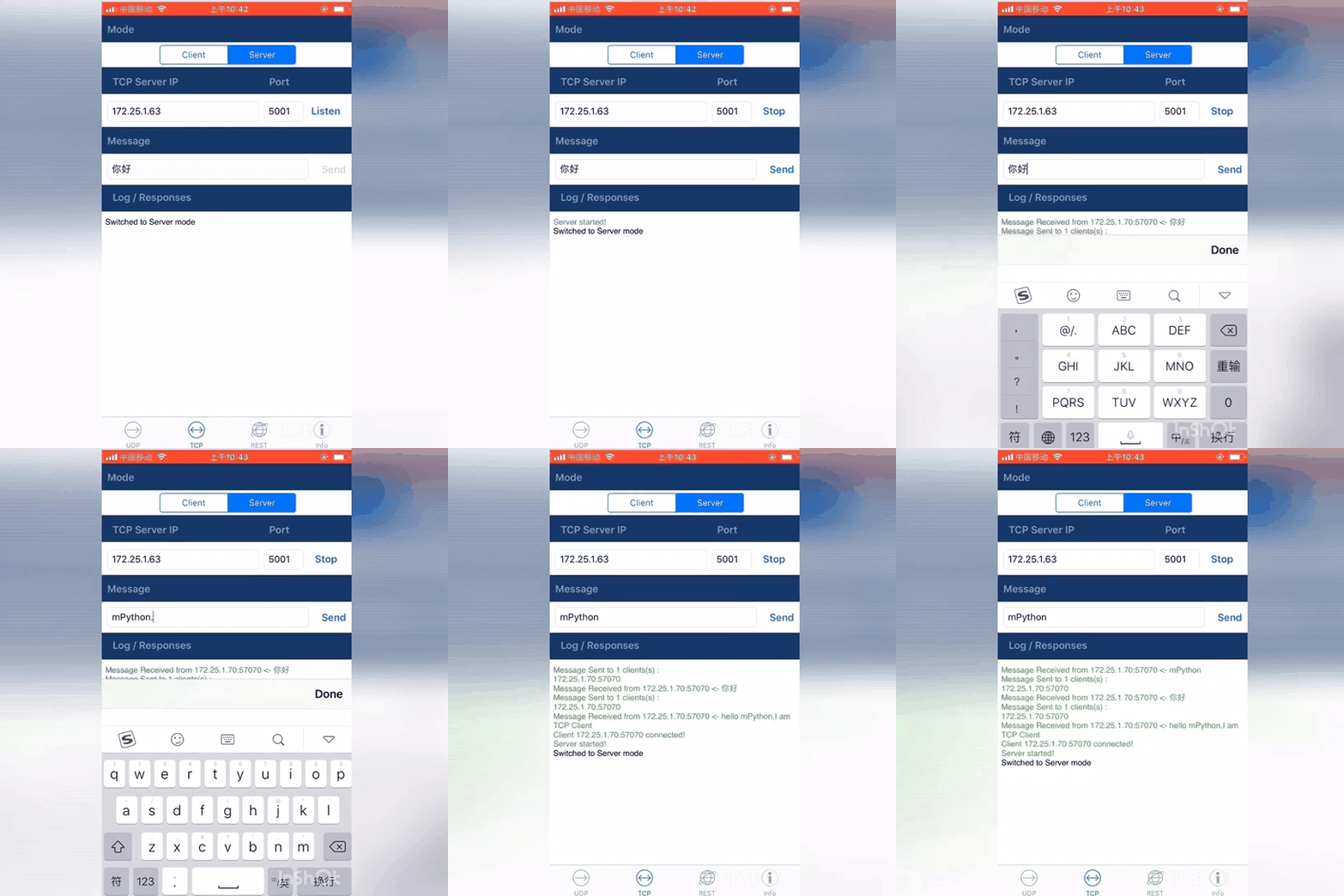
First, the mPython Board and mobile phone must be connected to the same local area network. OPen Network Test Utility,Enter the “TCP Server” interface.
TCP Server IP selects the IP address of the mobile phone in the network, and the port number can be set from 0 to 65535. Then, click Listen to start listening on the port.
Set the TCP server IP address host and port number port selected above in the program, restart the program。
When the connection to the Server is successful, the TCP Server will receive the text hello mPython,I am TCP Client sent by the Client. At this point, you send text to the Client in the TCP Server, the control panel will
receive text and display the text on the OLED screen.
10.3.3.2. TCP server
The general steps of the TCP programming server are:
- Create a socket, use function socket()
- To set the socket attribute, use the functions setsockopt() , optional
- Bind the IP address, port and other information to the socket, use the function bind()
- Turn on monitoring and set the maximum monitoring number, use the function listen()
- Wait for the client to request a connection, use the function accept()
- To send and receive data, use the functions send() and recv(),or read() and write()
- Close network connection
tcpServer example:
1 2 3 4 5 6 7 8 9 10 11 12 13 14 15 16 17 18 19 20 21 22 23 24 25 26 27 28 29 30 31 32 33 34 35 36 37 38 39 40 41 42 43 44 45 | import socket
from mpython import *
port=5001 # TCP服务端的端口,range0~65535
listenSocket=None
mywifi=wifi() # 创建wifi类
# 捕获异常,如果在"try" 代码块中意外中断,则停止关闭套接字
try:
mywifi.connectWiFi("ssid","password") # WiFi连接,设置ssid 和password
# mywifi.enable_APWiFi("wifi_name",13) # 还可以开启AP模式,自建wifi网络
ip= mywifi.sta.ifconfig()[0] # 获取本机IP地址
listenSocket = socket.socket(socket.AF_INET, socket.SOCK_STREAM) # 创建socket,不给定参数默认为TCP通讯方式
listenSocket.setsockopt(socket.SOL_SOCKET, socket.SO_REUSEADDR, 1) # 设置套接字属性参数
listenSocket.bind((ip,port)) # 绑定ip和端口
listenSocket.listen(3) # 开始监听并设置最大连接数
print ('tcp waiting...')
oled.DispChar("%s:%s" %(ip,port),0,0) # oled屏显示本机服务端ip和端口
oled.DispChar('accepting.....',0,16)
oled.show()
while True:
print("accepting.....")
conn,addr = listenSocket.accept() # 阻塞,等待客户端的请求连接,如果有新的客户端来连接服務器,那麼会返回一个新的套接字专门为这个客户端服务
print(addr,"connected")
while True:
data = conn.recv(1024) # 接收对方发送过来的数据,读取字节设为1024字节
if(len(data) == 0):
print("close socket")
conn.close() # 如果接收数据为0字节时,关闭套接字
break
data_utf=data.decode() # 接收到的字节流以utf8编码解码字符串
print(data_utf)
oled.DispChar(data_utf,0,48) # 将接收到文本oled显示出来
oled.show()
oled.fill_rect(0,48,128,16,0) # 局部清屏
conn.send(data) # 返回数据给客户端
# 当捕获异常,关闭套接字、网络
except:
if(listenSocket):
listenSocket.close()
mywifi.disconnectWiFi()
|
Attention
In the above example, use connectWiFi() to connect to the same router WiFi. You can also use ` enable_APWiFi() to turn on the AP mode and build a wifi network to allow other devices to access it.
First, the mPython Board and mobile phone must be connected to the same local area network. The control panel restarts the running program, and the TCP Server end waits for the Client connection request. Open the Network Test Utility, enter the “TCP Client” interface, fill in the Remote host and port, namely socket.blind(ip,port)
IP address and port. After the Connect is successfully connected, send text, and the control panel receives the text and displays it on the oled screen and returns it to the TCP Client. You can see the text from Client->Server,Server->Client in the receiving interface of the mobile phone.
