audio — Provide audio playback related functions
This module provides audio recording and playback functions, using P8 and P9 pins as audio decoding output. As the mPython Board has no integrated speakers, it cannot directly play the audio source. You can use an expansion board with integrated speakers or connect P8 and P9 to the amplifier speakers yourself.
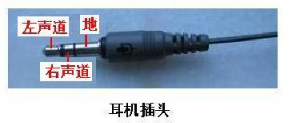
How to connect the control board to 3.5mm earphone:
- P8 – left channel
- P9 – right channel
- GND – GND
Parameter
Basic audio functions
Play
-
audio.player_init()
Initialize audio playback, open up cache for audio decoding.
-
audio.play(url)
Local or network audio playback, currently only supports wav, mp3 format audio.
Can play MP3 audio of the file system, or MP3 audio resources of the network. Play local mp3 audio due to micropython file system limitation and RAM size limitation, it is basically difficult to download when the file is larger than 1M. Therefore, there are restrictions on the size of audio files, which should be as small as possible. When playing network MP3 audio, you must first connect to the network, the URL must be a complete address, such as “http://wiki.labplus.cn/images/4/4e/Music_test.mp3” . Returns the decoding status. When it is 0, it indicates that the audio decoding instruction is acceptable; when it is 1, it indicates that it is currently in the decoding state and cannot respond.
url(str): Audio file path, string type. It can be a local path address or a URL address on the network.
1 2 3 4 5 6 7 8 9 10 | import audio # 导入audio
from mpython import wifi # 导入wifi
mywifi=wifi() # 实例wifi类
mywifi.connectWiFi('ssid','password') # 连接 WiFi 网络
audio.player_init() # 播放初始化
audio.play('music.mp3') # 本地音频解码
audio.play("http://wiki.labplus.cn/images/4/4e/Music_test.mp3") # 播放网络音频url
audio.player_deinit() # 播放结束,释放资源
|
-
audio.set_volume(vol)
Set audio volume
vol: set volume, range 0~100
-
audio.stop()
Stop audio play
-
audio.pause()
Pause audio play
-
audio.resume()
Audio playback resumes, used for replay after pause
-
audio.player_status()
Used to obtain whether the system is in the audio playback state, returns 1, indicating that it is currently playing, returns 0, indicating that the end of playback, is idle.
-
audio.player_deinit()
After the audio playback ends, release the cache
Recording
-
audio.recorder_init()
Recording initialization
-
audio.record(file_name, record_time = 5)
Record audio and store in wav formwt. Audio parameters are 8000Hz sampling rate, 16-bit, mono.
file_name- wav file storage path.record_time- Recording duration, default 5 seconds. The recording duration is limited by the space of the file system, and the maximum duration depends on the actual situation.
-
audio.recorder_deinit()
Free resources after recording
Example - recording:
import audio
from mpython import *

audio.recorder_init()
rgb[0] = (255, 0, 0)  # Use LED to indicate recording start and end
rgb.write()
audio.record('test.wav',5)
rgb[0] = (0, 0, 0)
rgb.write()
audio.recorder_deinit()